Beta 3 Release
Land of Assets Beta 3 — USDZ, Blender, KTX2, and MeshOpt Support
Beta 3 expands format support: upload Blender files, USDZ, and compressed GLBs, then download in any format on demand. Full SDK and CLI support included.
Ben Houston • 4 min read • February 27, 2026
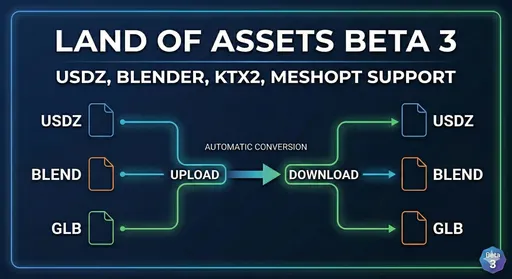
Beta 2 delivered ENV maps, a new asset wizard, and Google login. Beta 3 adds format flexibility: upload Blender files, USDZ, or compressed GLBs, and download any asset in any supported format on demand.
Engineering uses CAD. Artists use Blender. Web teams need GLB. AR delivery needs USDZ. Land of Assets accepts all of them and converts automatically, so no team waits on another to re-export by hand.
Blender (.blend) — The Artist's Source Format
Blender is the de-facto open-source tool for creating 3D assets. Until now, artists had to export GLB files before uploading. That step is gone.
You can now upload your .blend file directly to Land of Assets. We store the source file so you can download and keep editing it — no lossy export required. At the same time, we automatically transcode it to GLB and USDZ for delivery. Your pipeline gets both: an editable source and production-ready delivery formats, all from a single upload.
USDZ — Apple's AR Format
Apple uses USDZ as the primary format for augmented reality on macOS, iOS, and visionOS. If you're building AR experiences or shipping 3D content to Apple platforms, USDZ is non-negotiable.
Land of Assets now treats USDZ as a first-class format alongside glTF/GLB. Upload a USDZ and get a GLB. Upload a GLB and get a USDZ. The conversion is automatic and cached, so you never pay for it twice. As we explained in our earlier post on why we standardize on glTF, glTF remains our internal master format — USDZ is a delivery target we generate from it, and a source we can ingest from.
KTX2 and MeshOpt Compression in GLB
The glTF ecosystem now has two mature compression extensions:
- KTX2 (
KHR_texture_basisu): GPU-compressed textures that load faster and use far less memory at runtime. - MeshOpt (
EXT_meshopt_compression): Compressed mesh geometry for smaller file sizes and faster transfers.
Both are now fully supported for upload and 3D visualization. If you're already generating optimized GLBs with tools like gltf-transform or glTF-Pipeline, you can upload them directly and they'll render correctly in the asset viewer.
Automatic Format Conversion
Upload in any supported format. Download in any supported format. The full conversion matrix just works:
| Upload | Download as |
|---|---|
.blend | GLB, USDZ |
.usdz | GLB, BLEND |
.glb | USDZ, BLEND |
Conversions are generated on demand and cached, so the first request pays the conversion cost and every subsequent request is served from the cache. This is the "Automatic Optimization: format conversion" item from our roadmap — it's now shipped.
Download Any Format from the Asset Page
On the asset view page, you can now request a download in any supported format — BLEND, USDZ, or GLB — regardless of what you originally uploaded. No need to re-upload or maintain multiple versions of the same asset.
SDK Example
All of this is fully accessible through the SDK. Here's a complete example that uploads a USDZ file and then downloads it as a GLB:
import { readFile, writeFile } from 'node:fs/promises';
import { createSecretTokenInstance, uploadFile, createAsset, getAssetModel } from '@landofassets/sdk';

const client = createSecretTokenInstance({
  host: 'https://api.landofassets.com',
  secretToken: process.env.LOA_SECRET_TOKEN!,
});

// 1. Upload a USDZ source file
const fileData = await readFile('chair.usdz');
const uploadToken = await uploadFile(client, {
  params: { orgName: 'my-org', projectName: 'my-project' },
  fileData,
  filename: 'chair.usdz',
});

// 2. Create the asset
await createAsset(client, {
  params: { orgName: 'my-org', projectName: 'my-project' },
  body: {
    name: 'chair',
    type: 'MODEL',
    uploadToken,
    visibility: 'PUBLIC',
    shareLicense: 'CC_BY',
  },
});

// 3. Download as GLB — auto-converted and cached on demand
const { data } = await getAssetModel(client, {
  params: {
    orgName: 'my-org',
    projectName: 'my-project',
    assetName: 'chair',
    format: 'glb',
  },
  query: {
    mode: 'sync', // block until conversion is complete
  },
});
await writeFile('chair.glb', Buffer.from(data));
The same pattern works for any combination: upload .blend, download .usdz; upload .glb, download .blend. The SDK is fully typed so your IDE will guide you through the available format options.
CLI Support
The loa CLI supports all new formats out of the box. Upload a Blender source file and download it as USDZ for Apple AR delivery — no manual export step required:
# Upload a Blender source file
loa assets create --file character.blend --project characters --org my-org

# Download it as USDZ — auto-converted on demand
loa assets download --asset character --format usdz --org my-org --project characters
Get in Touch
We're building this for enterprise teams managing 3D content and want to hear from you. Feature ideas, integration questions, or feedback: bring them to Discord or book a demo.